Thesis Capstone · Mobile Design
Usher — Personalized Academic Discovery
An 8-month master's thesis exploring why students underuse credible academic resources and how course-aware personalization could reduce the friction of discovery.
Role
UX Researcher & Product Designer
Timeline
8 Months
Team
Independent thesis project
Methods
Interviews · Pretotyping · IA · Prototyping · Usability Testing
University libraries already provide students with credible academic content, but access alone does not make those resources easy to use.
Early research showed a gap between what universities offered and how students actually behaved. Students regularly turned to Google Scholar and other external tools because they felt faster, more familiar, and easier to navigate.
Even among students who described themselves as library users, interviews revealed that many primarily used the library for studying, printing, IT support, or other non-research activities.
23 / 27
reported difficulty finding relevant library resources
27 / 27
used Google Scholar or other external platforms for research
2 / 12
interview participants consistently used academic library resources
The thesis's recruitment survey showed 23/27 struggling to find relevant resources and all 27 using external research platforms; deeper interviews then found only two of twelve consistently used academic research materials.
The Gap
The data revealed a troubling pattern
Before talking to students, I reviewed existing research on how students approach academic work today. What I found set the stage for deeper investigation.
These patterns highlight a growing gap between available academic resources and how students actually search for information — setting the stage for deeper primary research.
Don't redesign the library. Rethink how students access it.
Usher is an AI-powered mobile companion that automatically connects Canvas assignments to library resources — eliminating the search step entirely. Instead of asking students to adapt to complex systems, Usher meets them within their existing academic flow.
Canvas Sync
Direct integration pulls assignment titles, descriptions, and due dates — no manual input required.
AI Matching
Algorithm analyzes assignment requirements and matches library metadata — without students writing a single search query.
Smart Notifications
Push alerts deliver contextual resource recommendations with relevance scores — exactly when students need them.
Mobile-to-Desktop Flow
Discover on your phone, access on your laptop. Email and text links on every resource bridge the gap seamlessly.
The App in Action
See how Usher removes the friction between students and the resources they need
Prototype walkthrough · Figma
Primary Research
I started broad, then looked for the gap between what students said and what they actually did.
I conducted structured interviews with 12 students across six disciplines, focusing on four questions:
How are students currently using library resources? Where does the experience break down? What tools do they use instead? And what would make credible academic resources easier to incorporate into their existing workflow?
The interviews were organized around awareness, current usage, barriers, and opportunities. I documented each session immediately afterward so that explicit comments, hesitation, workarounds, and behavioral patterns could be compared consistently during synthesis.
One pattern appeared early: “using the library” did not always mean using library resources.
Participant Distribution
Architecture
Medical
UX Design
Industrial Design
Textile Design
Construction Mgmt
“Even the website… it's kind of tricky. We are not able to easily find where the things are.”
Interview feedback consistently pointed toward effort, navigation and relevance.
Synthesis
I thought awareness was the problem. The evidence changed the problem.
Affinity mapping initially made awareness look like the dominant issue. Students often did not know about specific databases, workshops, or digital tools.
But awareness did not translate into use.
When I compared what students knew with what they actually did, a stronger pattern emerged: even students who knew resources existed often avoided them because navigation felt difficult, logins added effort, results felt disconnected from coursework, and external tools offered a faster starting point. That changed the problem I was solving.
From
“How might we make students more aware of library resources?”
To
“How might we reduce the friction university students face when trying to discover and engage with credible, course-aligned library resources?”
Initial assumption
Awareness
Evidence-based problem
- Discovery friction
- Navigation
- Course relevance
- Workflow disconnect
Research changed the frame →
Awareness vs. Navigation — Data from Participant Interviews
Introduced to resources during orientation
33%
Actually went to use them
Professors encouraged resource use
22%
Actually went to use them
Aware of Tuesdays with Librarian
10%
Actually attended the workshop
Design Challenge
How might we reduce the navigation friction university students face when trying to discover and engage with credible, course-aligned library resources?
Product Direction
Canvas was the strongest workflow fit. It was not feasible to prototype.
I explored several ways to reduce discovery friction, including physical wayfinding, a standalone mobile companion, and surfacing resources directly inside students’ course workflow.
The strongest conceptual direction was Canvas integration. It removed an entire discovery step: instead of asking students to remember that library resources existed, relevant materials could appear beside the assignments they were already working on.
But an early technical review exposed a real constraint. A functioning Canvas/Blackboard integration required institutional approvals, restricted system access, secure data exchange, and LTI 1.3 compliance—well beyond the timeline and access available for this thesis.
Rather than present a fake integration as functional, I used a mobile prototype as a vehicle for testing the underlying discovery experience. This direction was also supported by the research: 8 of 12 students described mobile searching as convenient and accessible.
Concepts Explored
Physical wayfinding
Useful for in-library navigation
Secondary opportunityMobile companion
Testable within thesis constraints
Chosen prototype vehicleCanvas integration
Best aligned with existing workflow
Strongest long-term fitDesign
From lo-fi sketches to a polished mobile experience
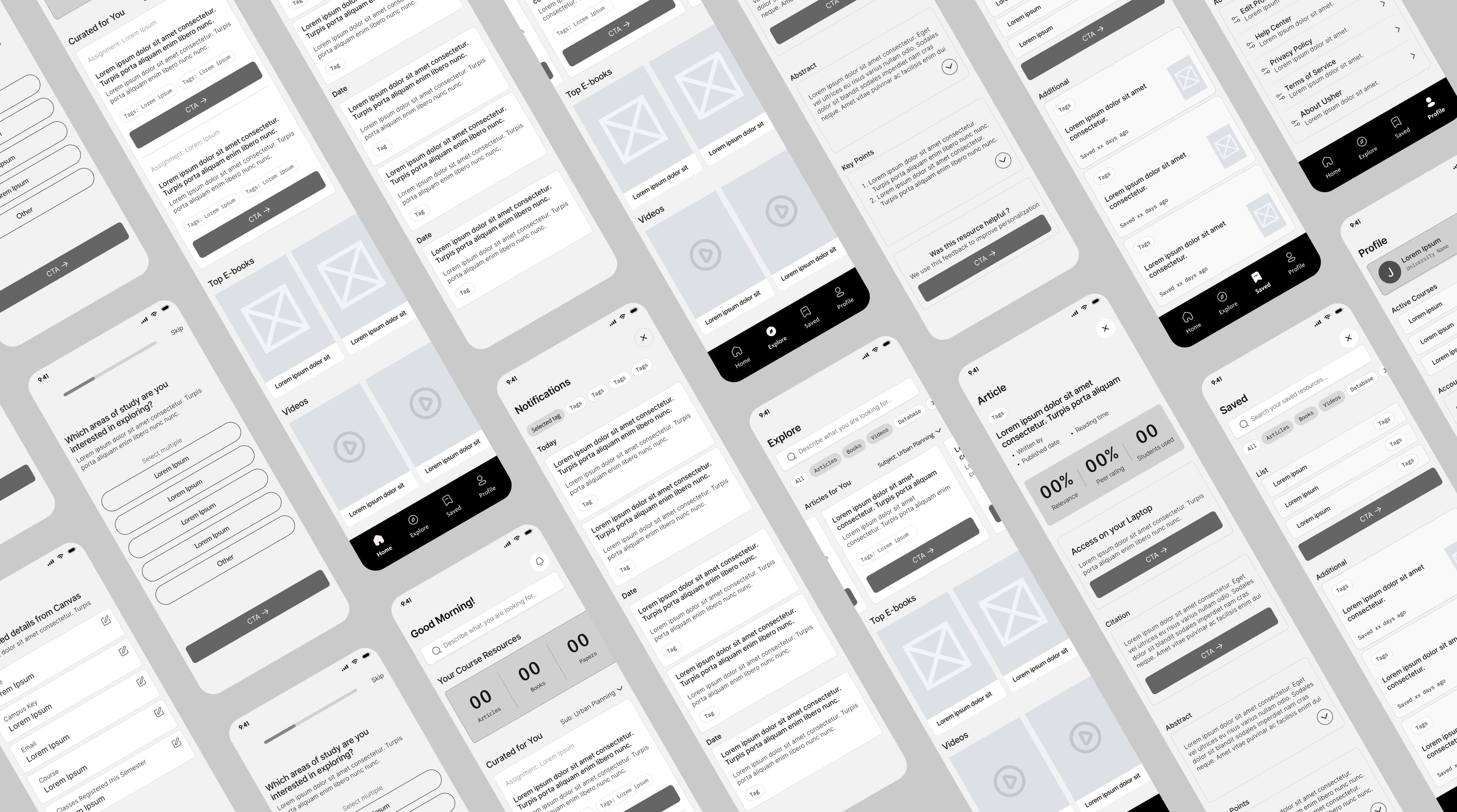
Lo-fi Wireframes
Low-fidelity wireframes helped map navigation patterns, search flows, and core screens before committing to visual polish — validating structure against student mental models from research.
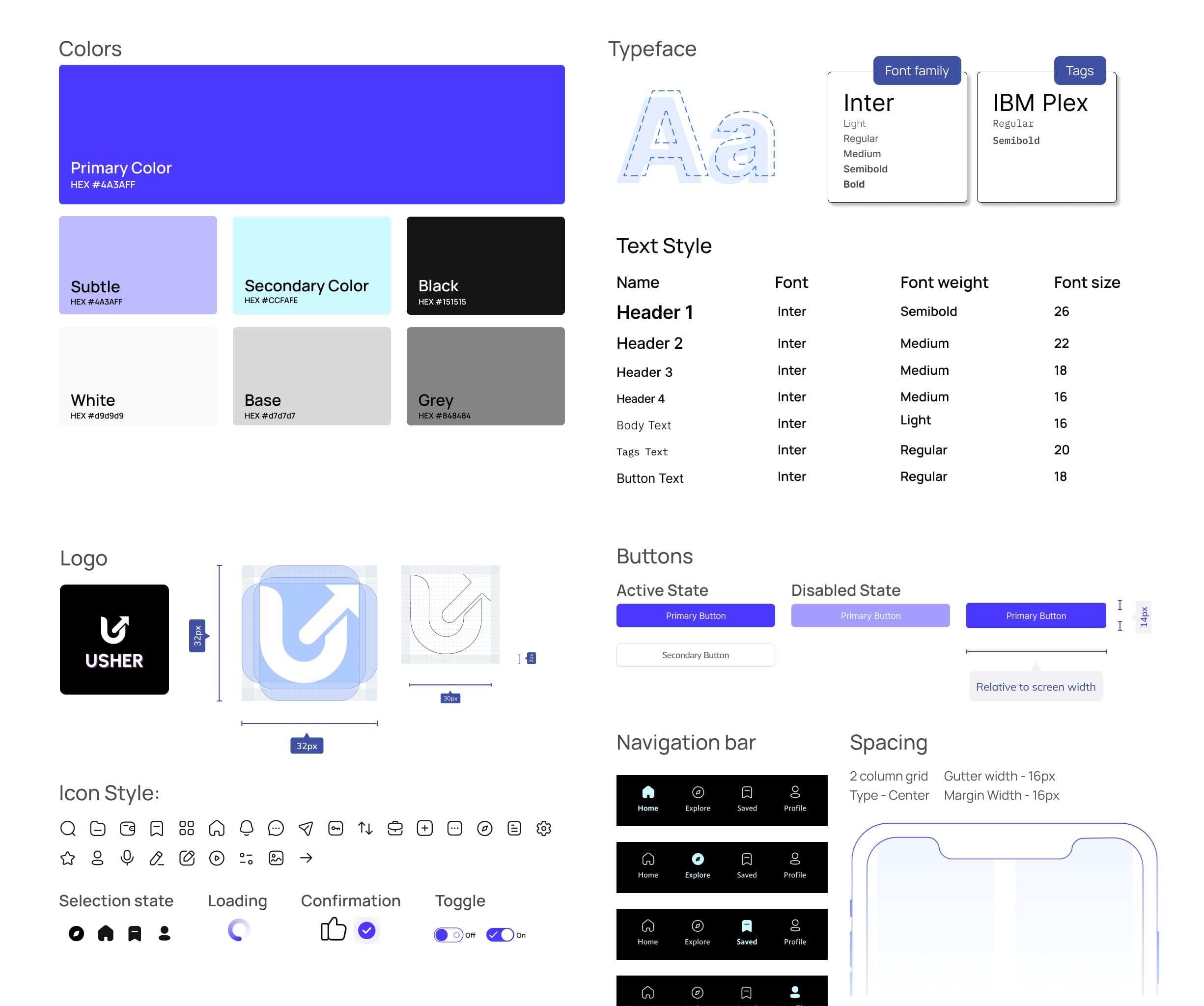
UI Exploration
Defined typography, color, and component patterns for a mobile-first companion that feels academic yet approachable — balancing clarity, trust, and scanability for quick discovery between classes.
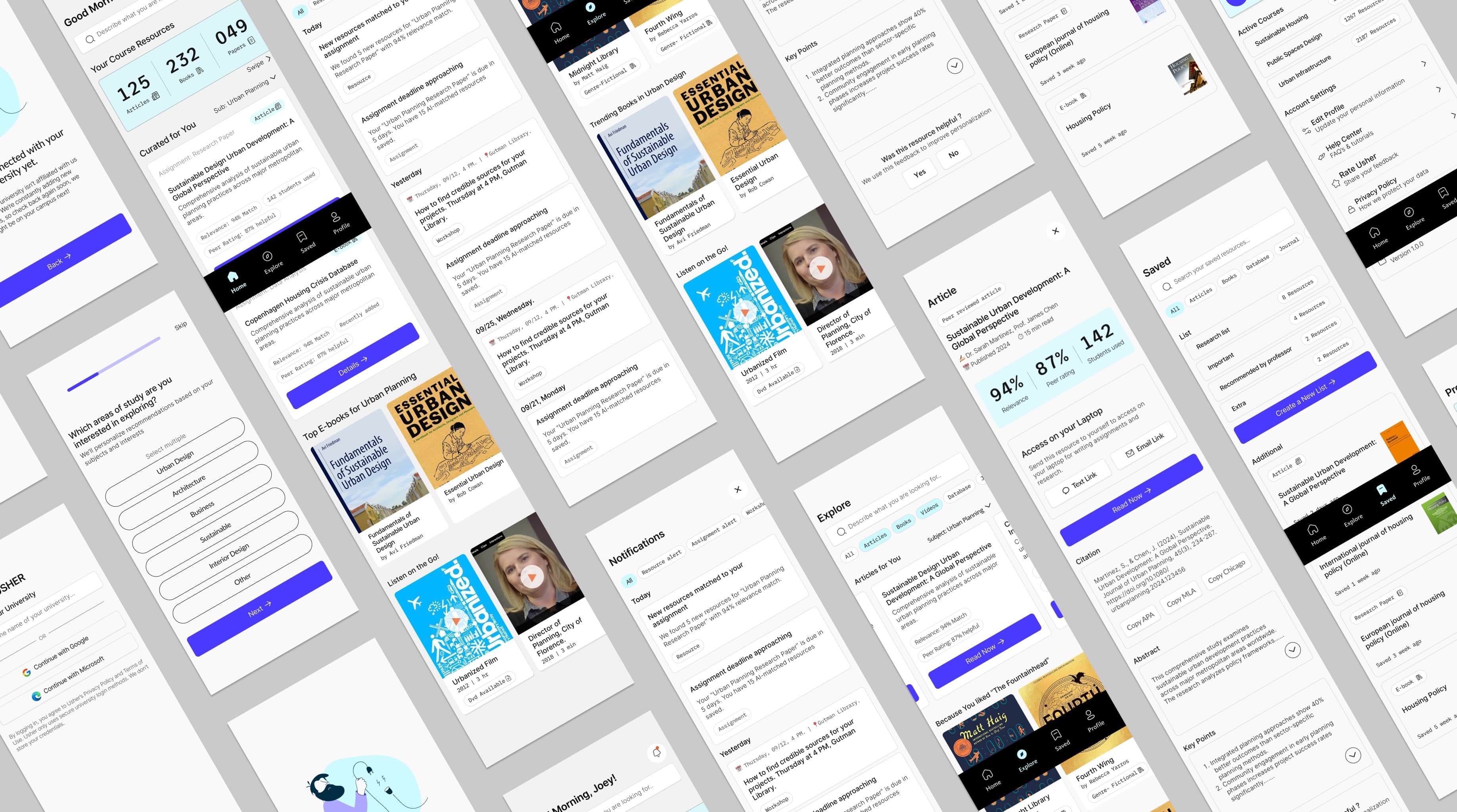
Hi-fi Wireframes
High-fidelity screens translated research into tangible interactions — from discovery and handoff to engaging with course-aligned resources — with clear hierarchy, affordances, and a consistent system across key flows.
Design Decisions
Every choice anchored in research
Meet students where they already are
Students live in Canvas to track deadlines and assignments. Instead of expecting them to leave their workflow to search for resources, I designed a mobile-first experience that integrates with their daily habits — the library comes to them, not the other way around.
Why this decision
Students discover resources in micro-moments on their phones but need laptop access for deep research. The seamless mobile-to-desktop handoff bridges discovery to delivery, matching actual behavior patterns revealed in interviews.
Make resource availability visible at a glance
10 out of 12 participants believed there were “no resources” available for their courses — factually incorrect. The interface needed to actively combat this “resource blindness” and prove its value immediately upon login through big quantitative counters (e.g., 232 Books, 125 Articles).
Why this decision
Perception shapes behavior. If students don't believe the library has relevant material, they won't try. High-level metrics serve as immediate visual proof of abundance, validating the library's utility before the student even searches.
Redesign discovery to reduce cognitive load
Initial concepts mimicking traditional database lists were failing — they required too much cognitive effort to parse, causing abandonment before search began. I shifted to a “Netflix-style” discovery model using cover art, horizontal scrolling, and bite-sized descriptions.
Why this decision
Students are accustomed to content-forward browsing patterns from streaming apps. Matching that familiar interaction model lowers the barrier to entry, encouraging exploration rather than intimidation from academic-looking interfaces.
Outcomes
Validated through testing
What Worked
- ↗
Interviewing across multiple departments gave genuinely diverse perspectives, not a narrow sample.
- ↗
Validating student insights with the library director aligned user needs with institutional constraints early.
- ↗
Anchoring every design decision in research prevented solution bias and feature overload.
Would Do Differently
- ↻
Test navigation concepts earlier using low-fidelity prototypes before committing to visual direction.
- ↻
Involve institutional stakeholders sooner to surface technical and operational constraints earlier in the process.
- ↻
Narrow solution scope faster through quicker validation cycles rather than polishing too early.
Next Steps
- →
Expand usability testing with a larger and more diverse student population across universities.
- →
Explore deeper integration with existing academic tools such as learning management systems.
- →
Measure long-term engagement to evaluate whether improved navigation leads to sustained library usage.
Biggest Learning
What initially appeared to be an awareness problem was actually a navigation issue. Deep behavioral analysis revealed that friction in finding relevant resources — not lack of interest — was the primary barrier to library usage.
Next Project
Constant Mobile App
Mobile Design · Habit Design · Wellness